This guide follows one decision from start to finish: whether a small rural hospital in Madison Parish, Louisiana, should apply for a telehealth grant. Each part of RHIP Atlas is introduced at the point where the decision needs it.
The video follows the same Madison Parish example as the written guide, step by step, with narration. Watch it first for the overview, then use the steps below to repeat the work in the Atlas yourself.
Narrated walkthrough, 12 min 46 s. Captions are available from the player's CC button.VIDEO · SEPTEMBER 2026
A funding notice arrives, and the board meets on Friday.
The example in this guide is invented. You lead Madison Parish Hospital in Tallulah, in northeast Louisiana. A notice for rural telehealth funding has arrived, and the board wants a recommendation by Friday: apply, or do not. You have no analyst on staff. The Atlas is where you will gather the evidence.
The parish figures, facilities and RHIA answer shown here are what the Atlas returned when the screens were captured in September 2026. If the data has been updated since, your numbers may differ slightly.
The guide has seven steps. Each step asks one question, shows where to click, and ends with a line to write down. Keep a notes file open. By step 7 those lines add up to the one-page brief the board will read.
Is Madison Parish rural? Eligibility starts with geography.
Is the need documented? The case rests on measured gaps, not impressions.
How does Madison compare with a neighbor? One number means little alone.
What care already exists nearby? A project should fill a gap, not repeat a clinic down the road.
What is our service area? The area you choose decides which numbers go into the application.
What does RHIA say? It can draft a brief and point out gaps, and every claim in it needs checking.
Where do the numbers come from, and how do we save the work? Every figure needs a source and a date.
What the Atlas can and cannot do
The Atlas supports a first pass. It does not decide eligibility. RHIA is experimental and can be wrong. Final eligibility, legal and financial decisions rest on the funding notice and the original data sources.
Before step 1
The Atlas screen.
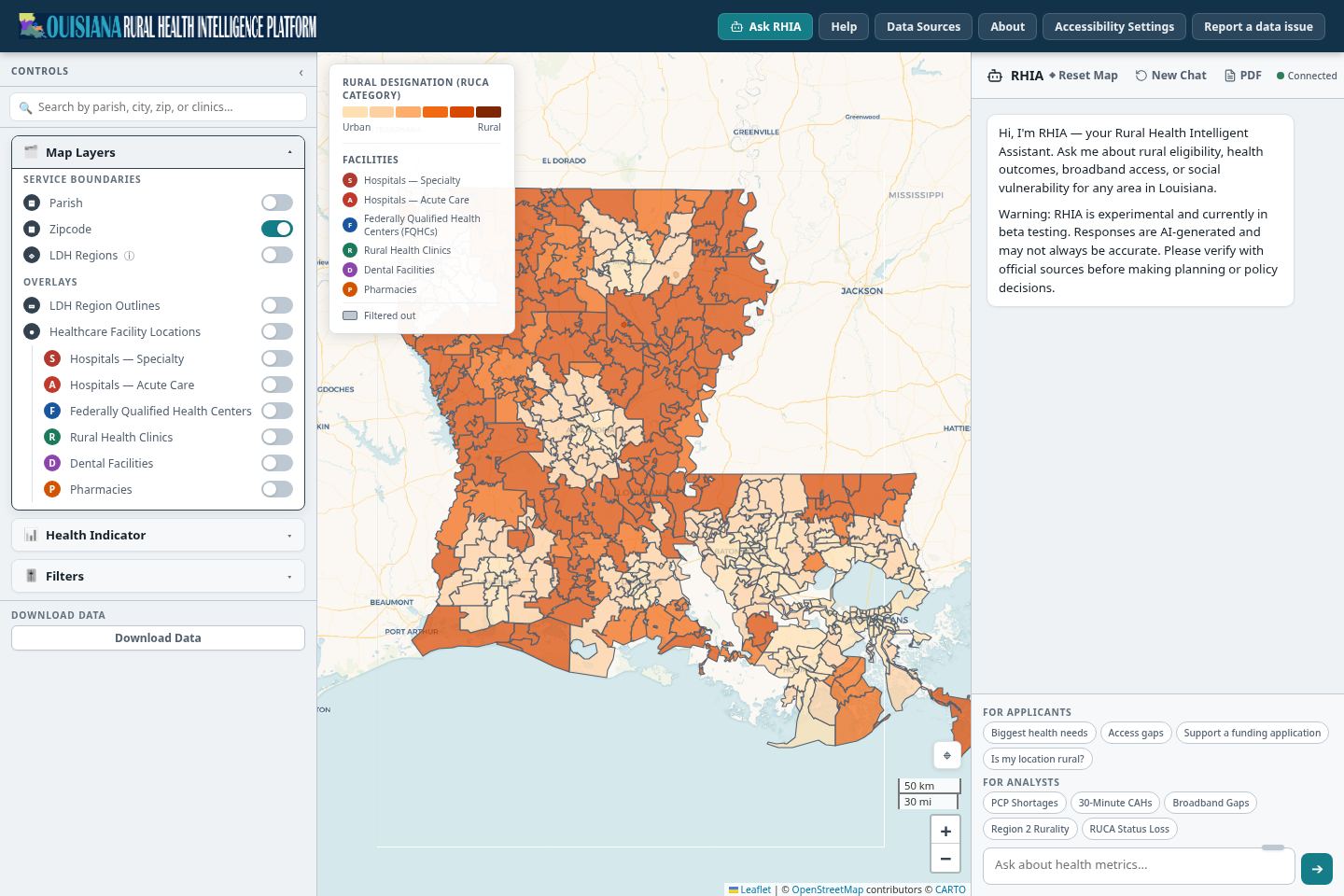
Everything in this guide happens on one screen. It has a search box and controls on the left, a map in the middle, the RHIA chat on the right, and a bar of buttons across the top. Select a numbered marker on the picture, or read the list under it.
Search. Type a parish, city, ZIP code or facility name. Places and facilities appear in one list.Controls. Three sections: Map Layers (boundaries, overlays, facility types), Health Indicator (what colors the map) and Filters (limit the map to places in a range). Opening one closes the others.Legend. It names the indicator on the map, shows which end of the color scale is higher, and keys the facility markers. Drag it if it covers something.Map. Click a place to open its summary. Hold Ctrl (Command on a Mac) and click to select several places at once.RHIA chat. Starter questions sit under the message box, grouped For applicants and For analysts. RHIA can also change the map.Top bar. Help, Data Sources, About, Accessibility Settings and Report a data issue.Download Data. Saves the data behind the current map as a CSV file.
The workspace as it opens. The map starts on ZIP codes, colored by rural designation.ATLAS WORKSPACE
1Search. Type a parish, city, ZIP code or facility name. Places and facilities appear in one list.
2Controls. Three sections: Map Layers (boundaries, overlays, facility types), Health Indicator (what colors the map) and Filters (limit the map to places in a range). Opening one closes the others.
3Legend. It names the indicator on the map, shows which end of the color scale is higher, and keys the facility markers. Drag it if it covers something.
4Map. Click a place to open its summary. Hold Ctrl (Command on a Mac) and click to select several places at once.
5RHIA chat. Starter questions sit under the message box, grouped For applicants and For analysts. RHIA can also change the map.
6Top bar. Help, Data Sources, About, Accessibility Settings and Report a data issue.
7Download Data. Saves the data behind the current map as a CSV file.
Two habits before you start
Change one thing at a time, and read the legend after each change. The same color can mean a high value or a low one depending on the indicator.
On a phone the screen splits into Map, Controls and Chat tabs. A tablet or computer is easier for this work.
Step 1 of 7
Is Madison Parish rural?
Rural funding programs start with geography. Before anything else, find out how the Atlas classifies the place your hospital is in.
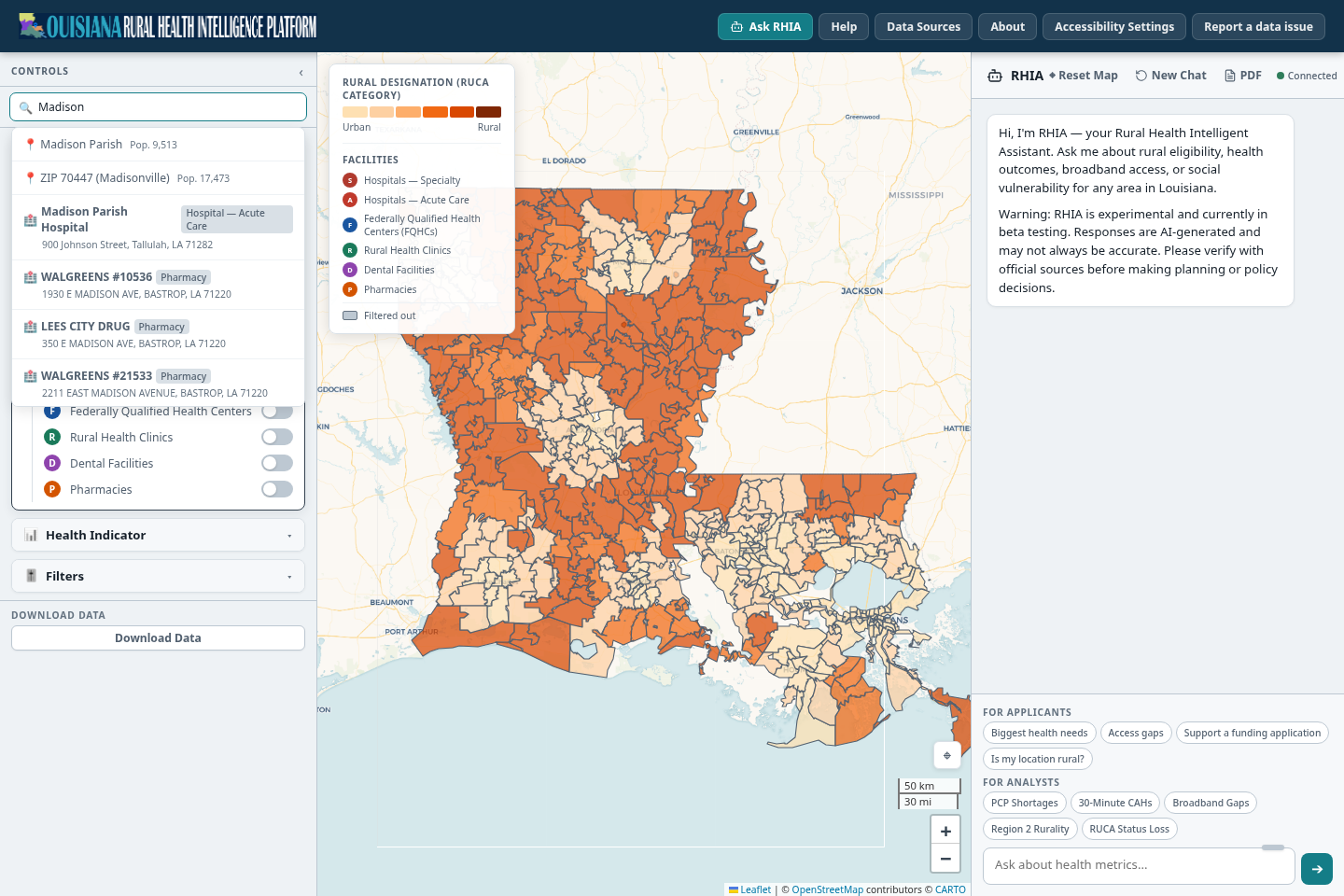
Click the search box and type Madison. Several places share the name. The list shows Madison Parish, ZIP code 70447 (Madisonville), Madison Parish Hospital and pharmacies with Madison in their address.
Choose the row marked Pop. 9,513. That is Madison Parish. The map zooms to it and a place summary opens.
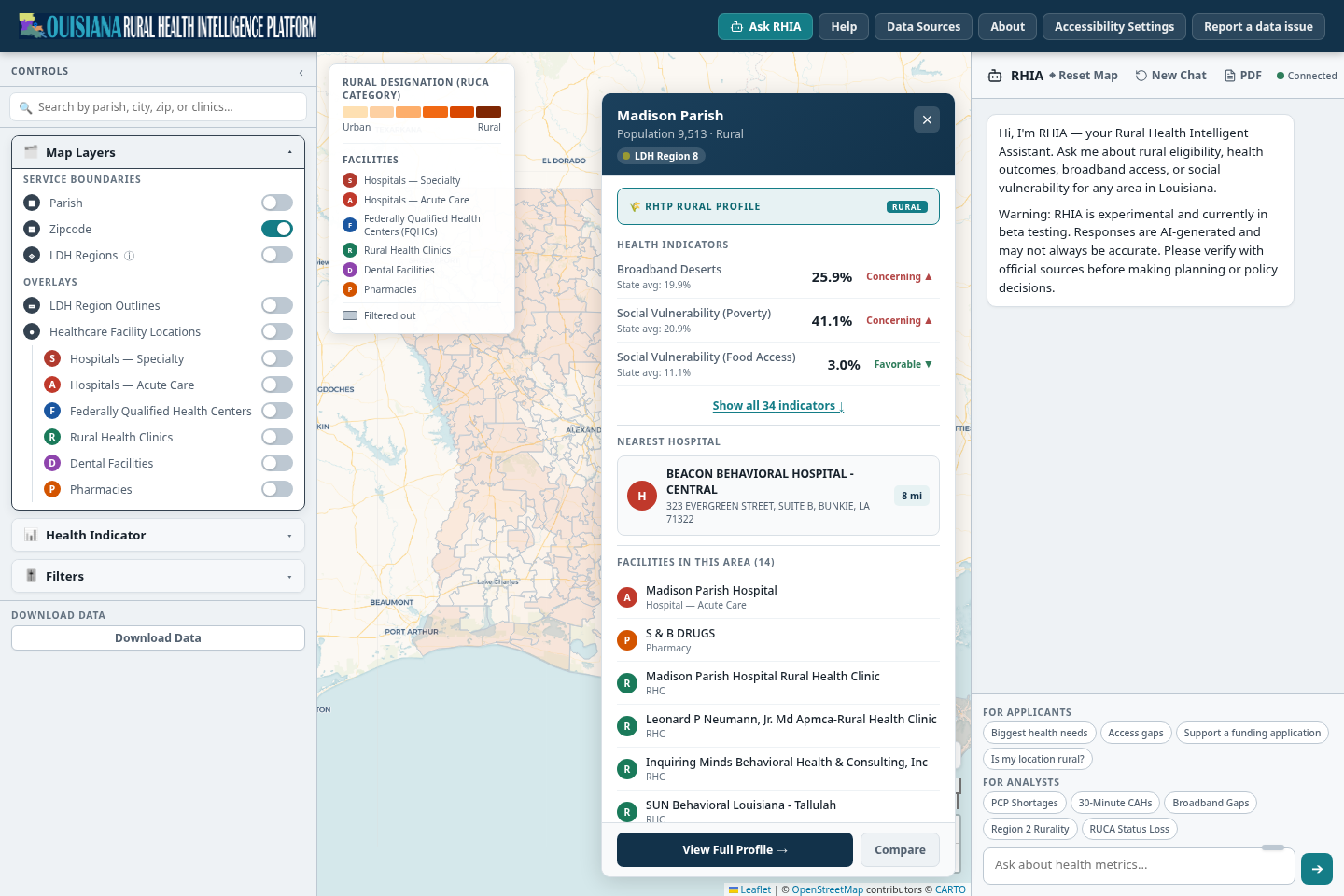
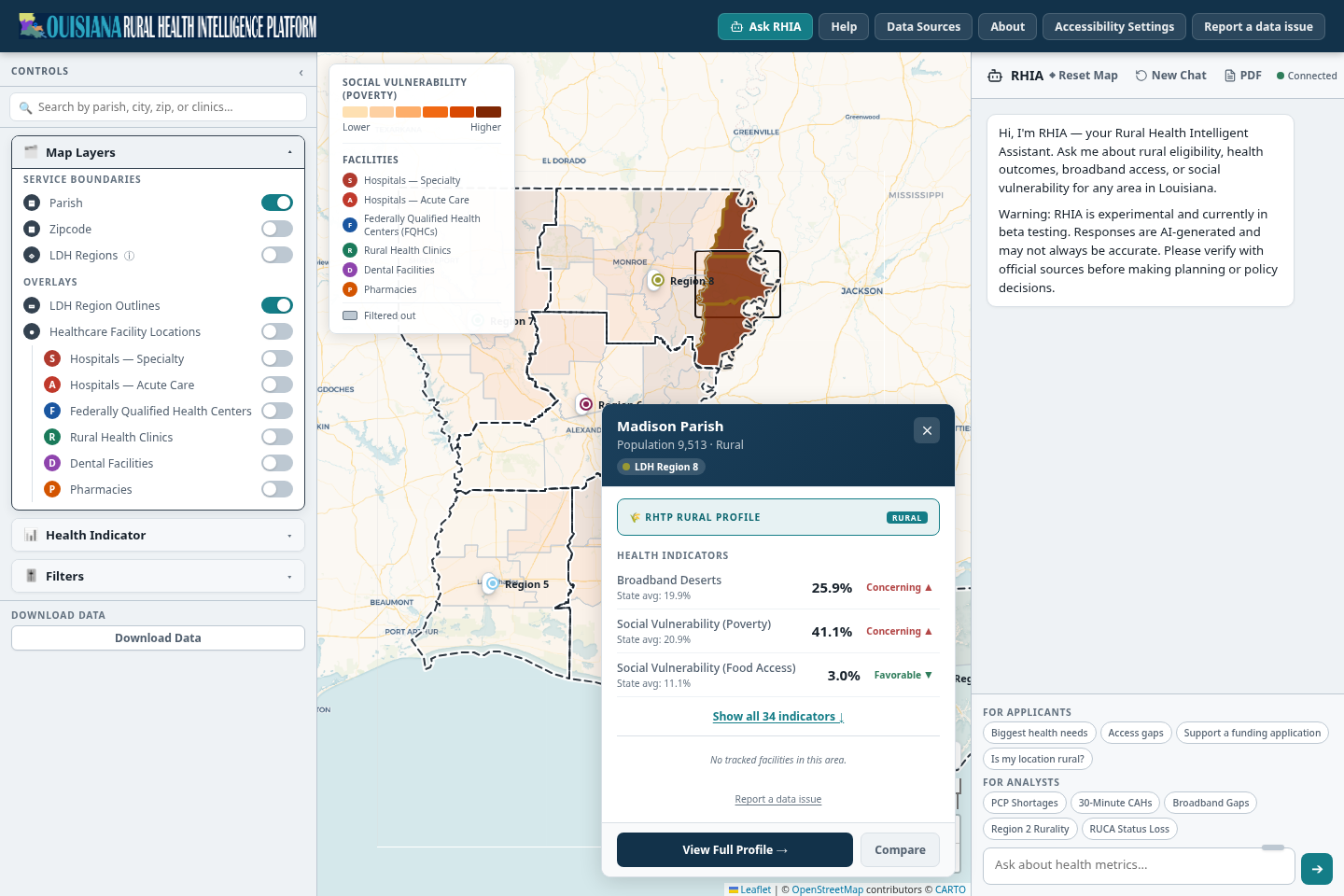
Read the top of the summary: the name, the population, the classification (Rural) and the LDH Region badge (Region 8).
Read the RHTP Rural Profile card. It shows the rural designation the platform holds for this place.
Read the three headline indicators, then the nearest hospital and the facility list. If the list says No tracked facilities in this area, switch on the facility layers in step 4 and look again.
The parish. The population figure tells it apart from other places named Madison.The hospital. Facilities appear in the same list, with type and street address.
Search covers places and facilities. Choose the row that matches the place you mean.SEARCH
1The parish. The population figure tells it apart from other places named Madison.
2The hospital. Facilities appear in the same list, with type and street address.
Name, population, classification and LDH Region badge.RHTP Rural Profile. The rural designation the platform uses for this place.Headline indicators. Each shows the parish value, the state average and a status word.Nearest hospital and the facilities in the area.View Full Profile opens every indicator (step 2). Compare sets two parishes side by side (step 3).
The place summary. The panel can be dragged aside, and the small x closes it.PLACE SUMMARY
1Name, population, classification and LDH Region badge.
2RHTP Rural Profile. The rural designation the platform uses for this place.
3Headline indicators. Each shows the parish value, the state average and a status word.
4Nearest hospital and the facilities in the area.
5View Full Profile opens every indicator (step 2). Compare sets two parishes side by side (step 3).
What the Atlas shows for Madison Parish
Population 9,513, classified Rural.
LDH Region 8, Northeast.
14 facilities listed for the area, among them the hospital, rural health clinics and pharmacies.
Write down
Madison Parish: Rural, LDH Region 8, population 9,513. Source: Atlas place summary, September 2026.
A screen, not a ruling
Funding programs use their own rural definitions, and some also depend on the applicant's facility type or where its patients live. Pathway 1 generally relies on geography. Pathway 2 combines geography with facility type. Pathway 3 needs evidence about where patients come from. Confirm the pathway in the funding notice.
Step 2 of 7
Is the need documented?
A telehealth case is stronger when it rests on a measured gap. Likely gaps here are broadband access, income and distance to care. Color the map by one indicator at a time, then compare Madison with the state.
Open Map Layers in Controls and switch the boundary from Zipcode to Parish. Parishes suit summary numbers and partnerships. ZIP codes show differences inside a parish.
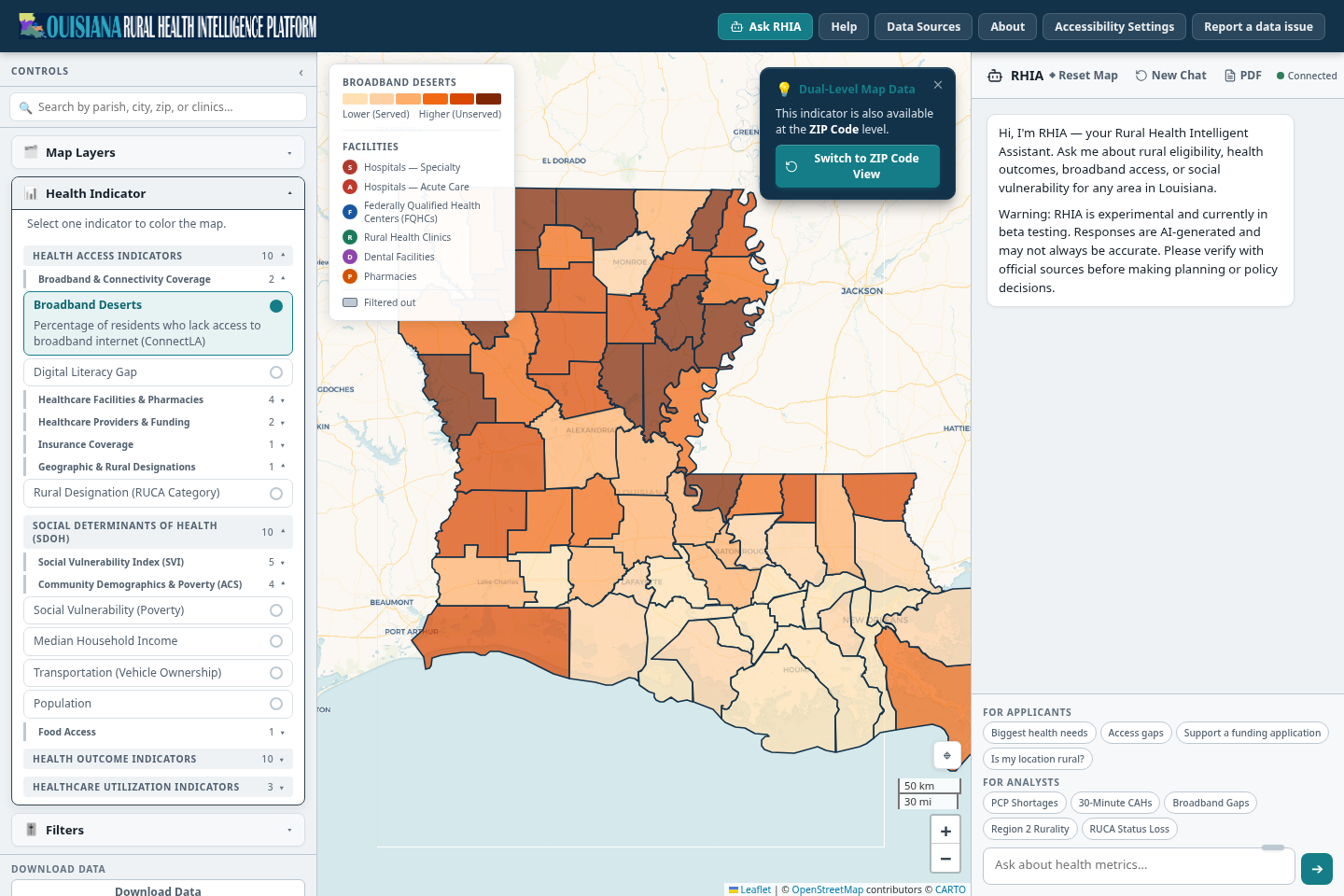
Open Health Indicator. The indicators are grouped as Health Access, Social Determinants of Health, Health Outcomes and Healthcare Utilization. Open Broadband & Connectivity Coverage and choose Broadband Deserts.
Read the legend. For this indicator a darker color means a larger share of residents without broadband. Find northeast Louisiana on the map.
A card says the indicator is also available by ZIP code. Switch to ZIP Code View changes the boundary and keeps the indicator.
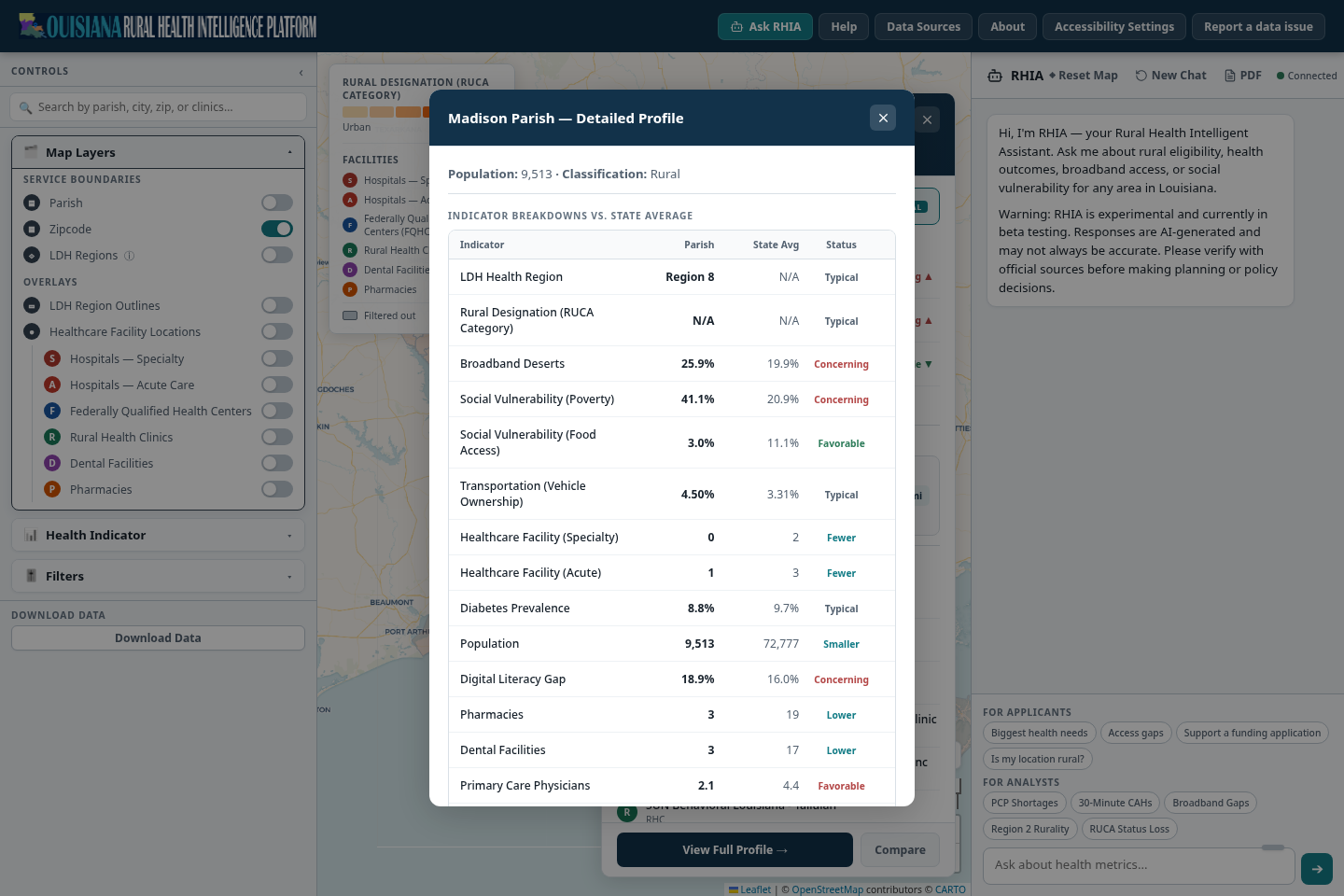
Open Madison's summary again and choose View Full Profile. The table lists every indicator with the parish value, the state average and a status word: Concerning, Typical, Favorable, or a plain comparison such as Fewer or Lower.
The chosen indicator, with its definition: the percentage of residents who lack access to broadband internet (ConnectLA).Legend. Lower (Served) to Higher (Unserved).The darkest parishes along the Mississippi River are in the northeast, where Madison Parish is.Dual-Level Map Data. The same indicator exists by ZIP code.
One indicator at a time. Broadband Deserts by parish.HEALTH INDICATOR
1The chosen indicator, with its definition: the percentage of residents who lack access to broadband internet (ConnectLA).
2Legend. Lower (Served) to Higher (Unserved).
3The darkest parishes along the Mississippi River are in the northeast, where Madison Parish is.
4Dual-Level Map Data. The same indicator exists by ZIP code.
Columns: the indicator, the parish value, the state average and a status word.Broadband Deserts: 25.9% against a state average of 19.9%. Concerning.Food Access: 3.0% against 11.1%. Favorable. This result does not help a need statement, and it belongs in your notes.Digital Literacy Gap: 18.9% against 16.0%. Concerning.
Read the variance from the state average. It shows which numbers support the project and which do not.FULL PROFILE
1Columns: the indicator, the parish value, the state average and a status word.
2Broadband Deserts: 25.9% against a state average of 19.9%. Concerning.
3Food Access: 3.0% against 11.1%. Favorable. This result does not help a need statement, and it belongs in your notes.
4Digital Literacy Gap: 18.9% against 16.0%. Concerning.
What the Atlas shows for Madison Parish
Broadband Deserts 25.9%, state 19.9%. Concerning.
Social Vulnerability (Poverty) 41.1%, state 20.9%. Concerning.
Digital Literacy Gap 18.9%, state 16.0%. Concerning.
Food Access 3.0%, state 11.1%. Favorable. Vehicle Ownership 4.50%, state 3.31%. Typical. Diabetes Prevalence 8.8%, state 9.7%. Typical.
Keep the favorable and typical results in your notes. A reviewer will look for them, and a case that acknowledges them is easier to defend.
Write down
Broadband gap 25.9% (state 19.9%), poverty 41.1% (state 20.9%), digital literacy gap 18.9% (state 16.0%). Source: Atlas full profile. Broadband source: ConnectLA Broadband Profiles, parish level, updated 2026.
Step 3 of 7
How does Madison compare with a neighbor?
One number means little alone. Two comparisons help. Set Madison next to a nearby parish, then look for every place in the state that shares a profile.
Parish against parish
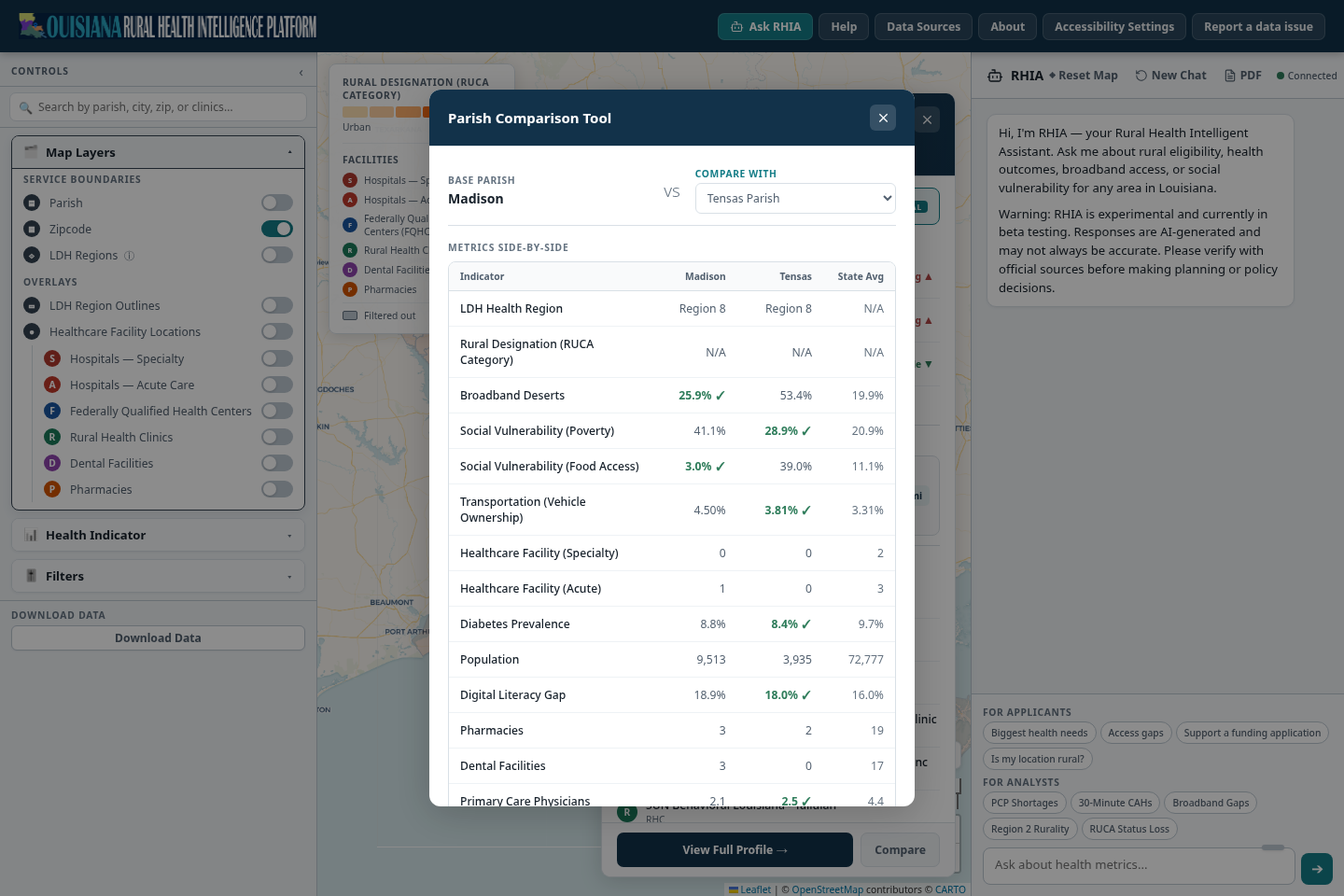
Open Madison's summary and choose Compare.
In the Compare with list, choose Tensas Parish, the neighbor to the south.
Read across each row: Madison, Tensas and the state average. A check mark sits on the better value where the indicator has a direction.
Choose the second parish here. Madison stays as the base.Madison has the better broadband figure: 25.9% against 53.4% in Tensas.Tensas has the lower poverty figure: 28.9% against 41.1%.
Same indicators, same denominators. This is the format a reviewer expects for a two-site proposal.PARISH COMPARISON
1Choose the second parish here. Madison stays as the base.
2Madison has the better broadband figure: 25.9% against 53.4% in Tensas.
3Tensas has the lower poverty figure: 28.9% against 41.1%.
Every place with a similar profile
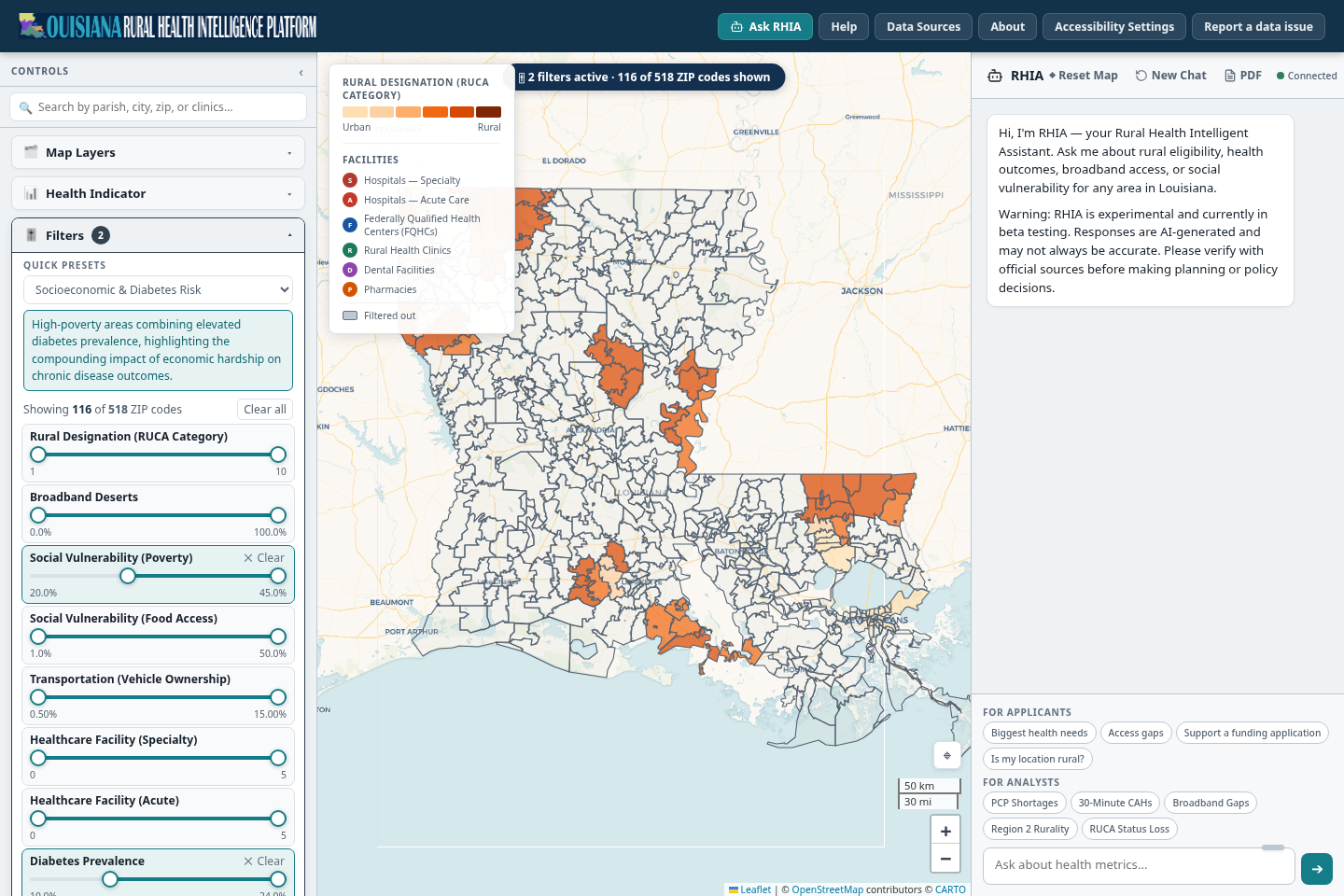
Open Filters in Controls. Each indicator has a range slider.
Under Quick Presets choose Socioeconomic & Diabetes Risk. A description appears and the sliders it uses are highlighted.
Read the count under the description: 116 of 518 ZIP codes match. A banner on the map repeats it, and places that do not match fade out.
Move one slider at a time to see how much the count changes. Clear all resets the filters.
Quick Presets. Three are offered: Socioeconomic & Diabetes Risk, Nutritional & Diabetes Risk, and Transit & Poverty Isolation.Count of matching ZIP codes: 116 of 518.The same count on the map, with the number of active filters.The sliders the preset set. The others stay at full range.Places that do not match are faded. The colored ZIP codes are the peers.
A preset is a starting hypothesis. Read the ranges it applies before you cite the count.FILTERS
1Quick Presets. Three are offered: Socioeconomic & Diabetes Risk, Nutritional & Diabetes Risk, and Transit & Poverty Isolation.
2Count of matching ZIP codes: 116 of 518.
3The same count on the map, with the number of active filters.
4The sliders the preset set. The others stay at full range.
5Places that do not match are faded. The colored ZIP codes are the peers.
What the Atlas shows
Madison and Tensas both sit above the state average for poverty and broadband gap. Tensas has the larger broadband gap (53.4% against 25.9%).
The Socioeconomic & Diabetes Risk preset matches 116 of 518 ZIP codes.
Write down
Madison against Tensas: broadband gap 25.9% against 53.4%, poverty 41.1% against 28.9%. Preset Socioeconomic & Diabetes Risk: 116 of 518 ZIP codes. Source: Atlas comparison tool and Filters.
Step 4 of 7
What care already exists nearby?
A telehealth project has to fit what is already there. It may fill a gap, or it may repeat a clinic down the road. Facility layers and drive-time rings show which.
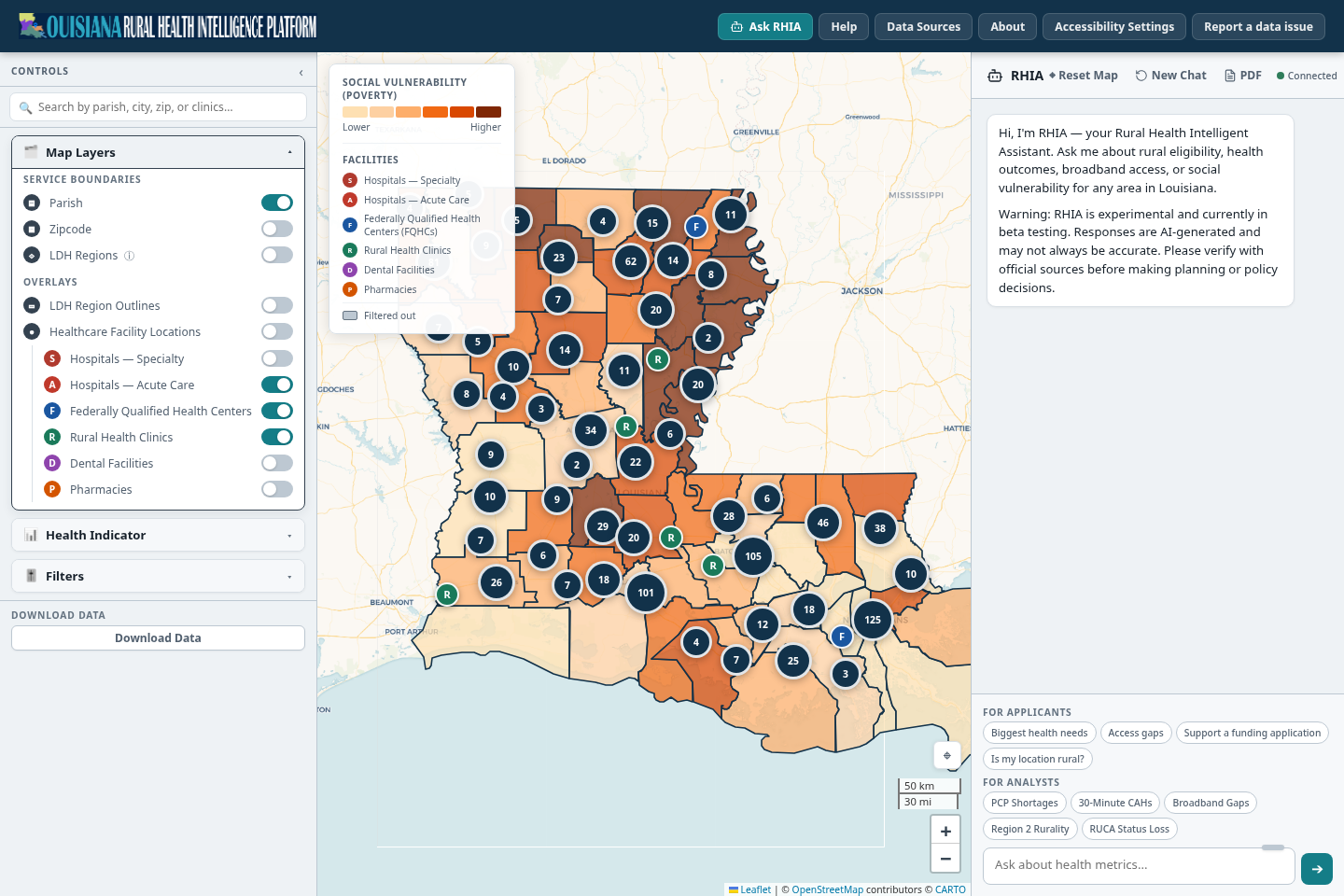
In Map Layers, under Overlays, switch on Hospitals — Acute Care, Federally Qualified Health Centers and Rural Health Clinics. Healthcare Facility Locations switches all six facility types on or off together.
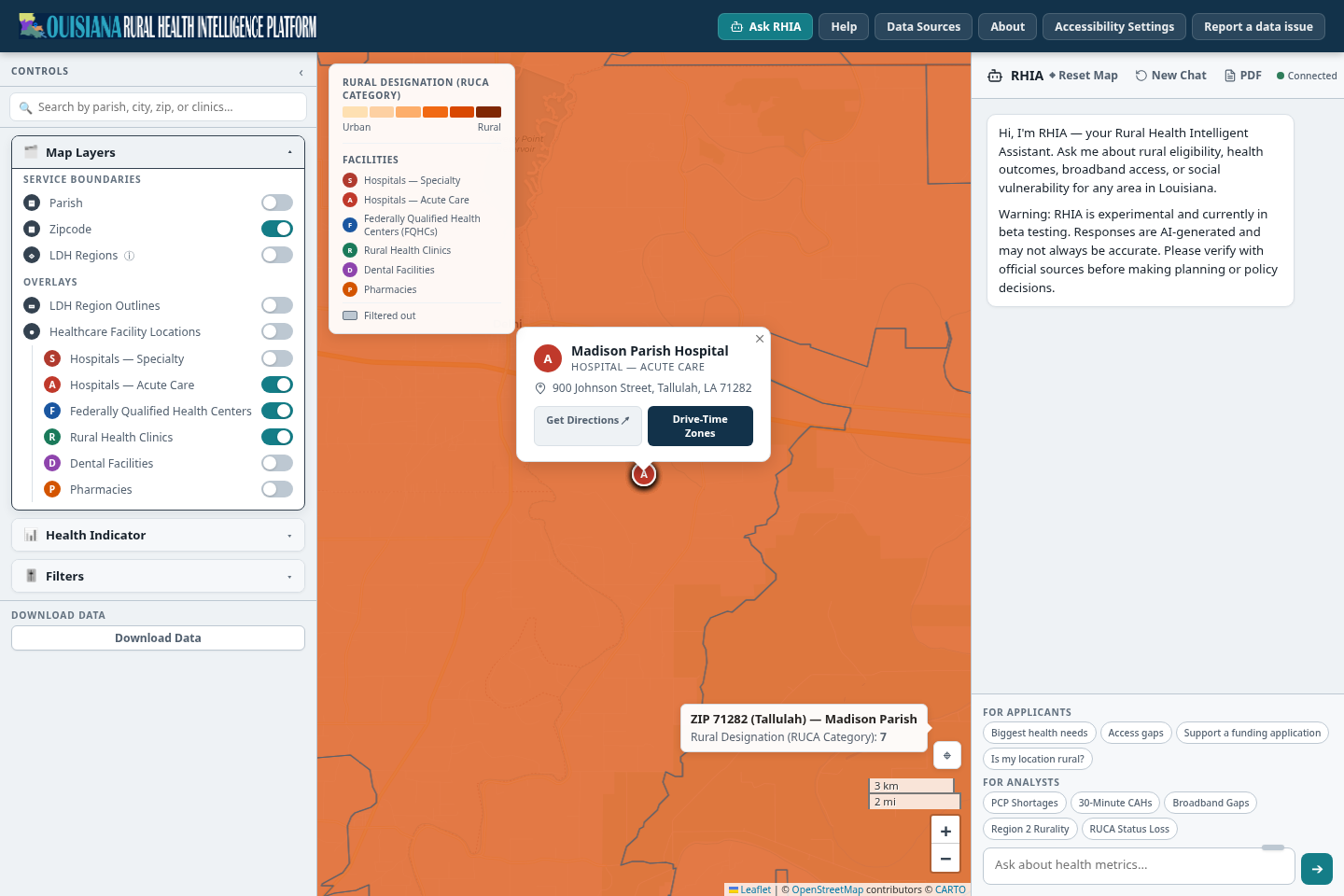
Numbered circles are clusters. Zoom in and they split into single markers. Each marker carries a letter for its type, so the map still reads without color: A acute hospital, F federally qualified health center, R rural health clinic, S specialty hospital, D dental, P pharmacy.
Search for Madison Parish Hospital and choose it. A popup gives the name, type and address, with Get Directions (opens Google Maps) and Drive-Time Zones.
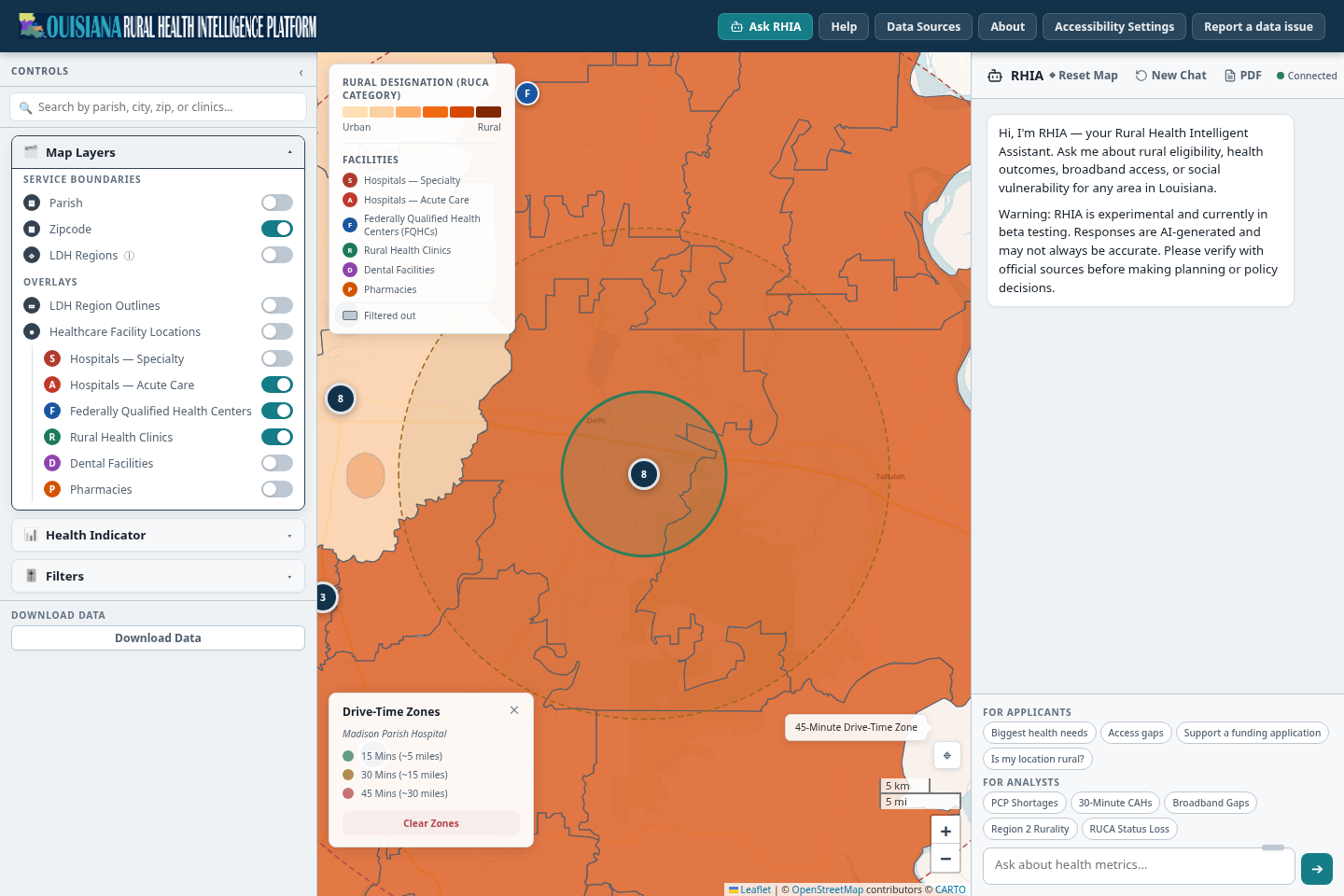
Choose Drive-Time Zones. Rings appear at 15, 30 and 45 minutes, roughly 5, 15 and 30 miles. Clear Zones removes them.
Move the pointer over the map. A tooltip names the place and gives the value of the active indicator.
Facility switches. Each type can be turned on alone to reduce clutter.The facility key in the legend.A cluster. The number is how many facilities it holds. Zoom in to separate them.A single marker. The letter gives its type.
Facilities by type across the state. Clusters split as you zoom.FACILITY LAYERS
1Facility switches. Each type can be turned on alone to reduce clutter.
2The facility key in the legend.
3A cluster. The number is how many facilities it holds. Zoom in to separate them.
4A single marker. The letter gives its type.
Name, type and address. Confirm this is the organization you mean.Get Directions opens the route in Google Maps.Drive-Time Zones draws the rings.The hover tooltip: ZIP 71282 (Tallulah), RUCA category 7.
One facility in detail. The map zooms to street level.FACILITY POPUP
1Name, type and address. Confirm this is the organization you mean.
2Get Directions opens the route in Google Maps.
3Drive-Time Zones draws the rings.
4The hover tooltip: ZIP 71282 (Tallulah), RUCA category 7.
The 15-minute ring, about 5 miles. The larger dashed ring is the 45-minute zone.The legend names the facility and gives approximate distances.Hover a ring to see which one it is.
Drive-time rings. Use them to frame an access question.DRIVE-TIME ZONES
1The 15-minute ring, about 5 miles. The larger dashed ring is the 45-minute zone.
2The legend names the facility and gives approximate distances.
3Hover a ring to see which one it is.
Limits of this view
A blank area does not prove that no service exists. The facility lists come from registries, and coverage varies. The rings are approximate and do not replace real routing. Report missing or wrong facilities with Report a data issue, and call a facility before you rely on it as a partner.
Write down
Madison Parish Hospital (acute care), 900 Johnson Street, Tallulah. The parish summary lists 14 facilities, including rural health clinics and pharmacies. Rings drawn at 15, 30 and 45 minutes. Source: Atlas facility layers, September 2026.
Step 5 of 7
What is our service area?
A hospital rarely serves one parish only. The service area you pick decides which numbers go into the application, and it is also what RHIA reads when you ask it a question.
See the region
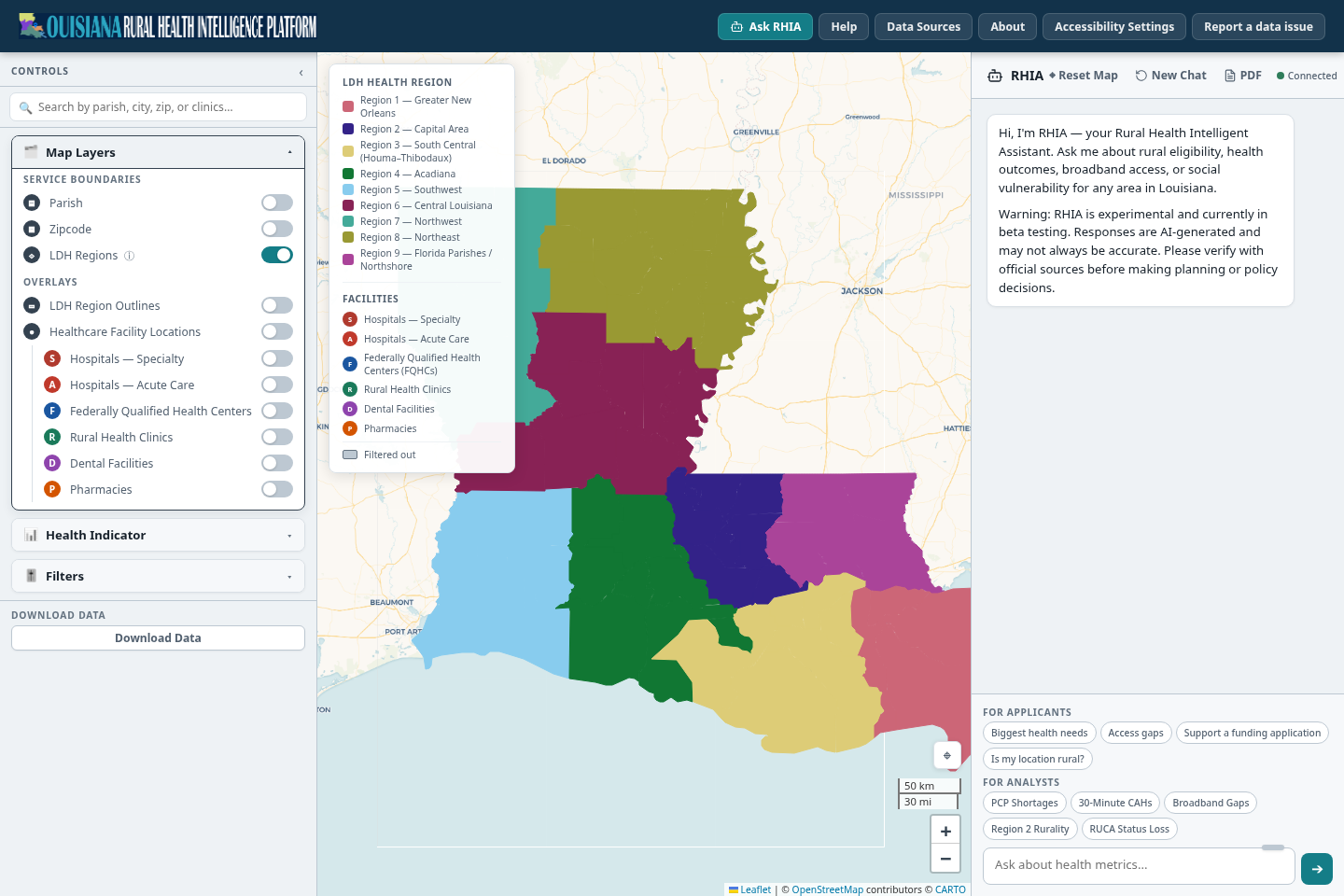
In Map Layers, switch on LDH Regions. Every parish takes the color of its LDH health region. The legend lists Region 1 (Greater New Orleans) through Region 9 (Florida Parishes / Northshore).
Madison Parish is in Region 8, Northeast.
Switch back to Parish and turn on LDH Region Outlines. Dashed region borders and a label for each region draw over the indicator you had on the map.
LDH Regions is a boundary choice, like Parish and Zipcode.The legend becomes a list of regions. Use these names when you ask RHIA about a region.Region 8, Northeast, which holds Madison Parish.
The region view. Each parish carries the color of its LDH region.REGION VIEW
1LDH Regions is a boundary choice, like Parish and Zipcode.
2The legend becomes a list of regions. Use these names when you ask RHIA about a region.
3Region 8, Northeast, which holds Madison Parish.
Select the parishes you serve
Hold Ctrl (Command on a Mac) and click East Carroll, then Tensas, then Madison. Selected parishes keep a dark outline and the rest of the map fades.
The summary shows the last parish you clicked. Closing it clears the whole selection.
From here RHIA treats the selection as one area, and the sample answer in step 6 draws on it.
The three selected parishes along the river.The summary shows the last parish clicked.Dashed region borders from LDH Region Outlines.The switch for the region outlines.
A service area of three parishes. Build the selection before you ask RHIA anything.MULTI-SELECTION
1The three selected parishes along the river.
2The summary shows the last parish clicked.
3Dashed region borders from LDH Region Outlines.
4The switch for the region outlines.
Regions are administrative
LDH regions help with regional framing and finding partners. A funding program may define its own regions and service areas. Use the definition in the notice.
Write down
Service area for this example: East Carroll, Madison and Tensas parishes, all in LDH Region 8. Source: Atlas region view and selection. The parish choice is a working assumption for management to confirm.
Step 6 of 7
What does RHIA say?
RHIA answers questions in plain language, cites its sources and can change the map. Use it to draft a brief and to find gaps in your evidence. Do not use it to settle eligibility.
Select Madison first, as in step 1. The Atlas sends the current boundary and selection along with your question.
Type the question below, or start from a chip under the message box. The first three chips For applicants fill in the parish or ZIP you selected.
Wait for the answer. While RHIA works, the send arrow turns into a stop button and a status line shows the elapsed time. Stop and rephrase if the answer drifts.
Read the answer from the top. Small superscript numbers point to the Sources list at the end.
Ask follow-up questions. Ask for contrary evidence and for what is missing.
The question used in this guide
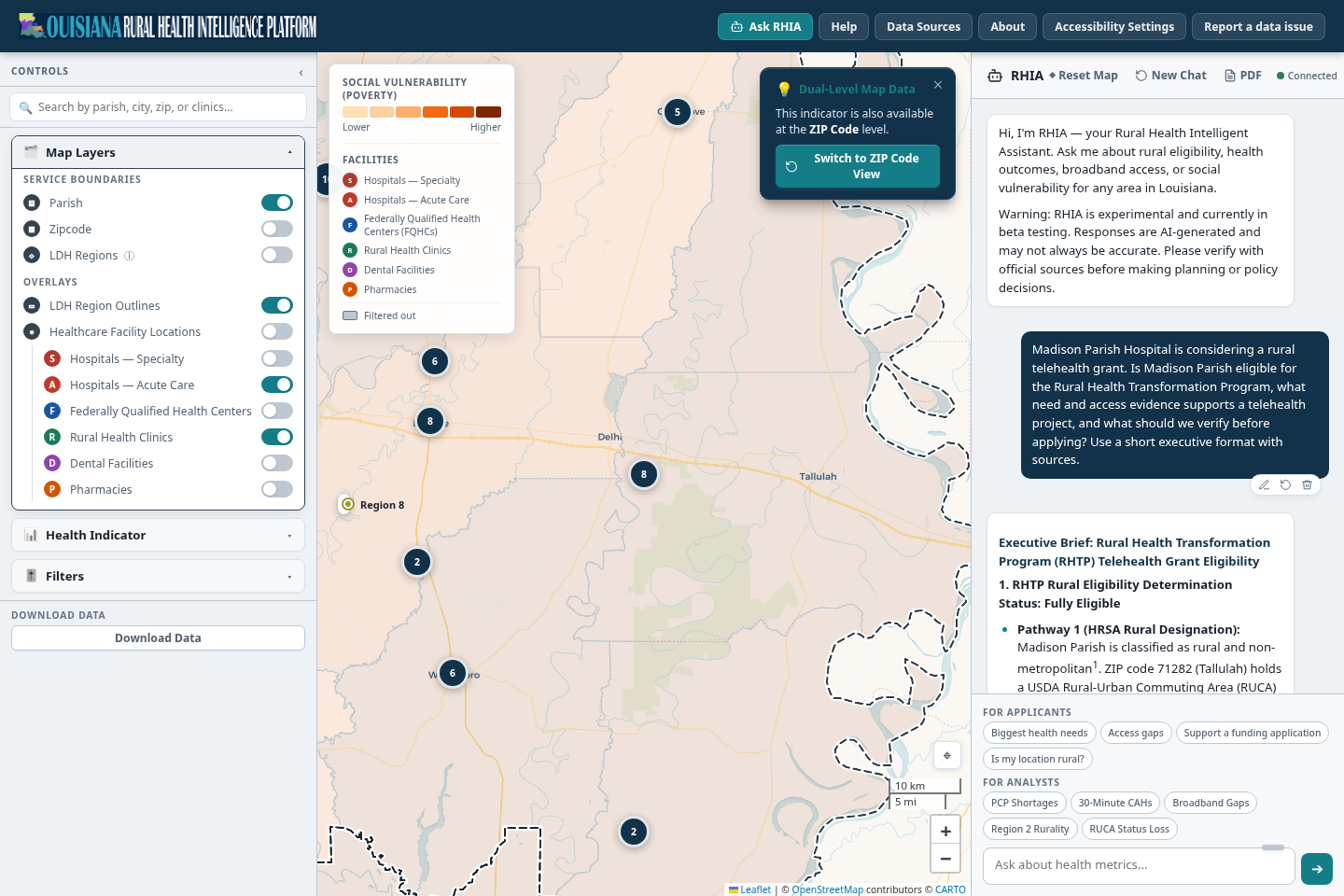
Madison Parish Hospital is considering a rural telehealth grant. Is Madison Parish eligible for the Rural Health Transformation Program, what need and access evidence supports a telehealth project, and what should we verify before applying? Use a short executive format with sources.
Your question. The pencil, arrow and bin icons under it edit and rerun it, or delete it.The answer opens with an executive brief in numbered sections.The map followed the question: it moved to Madison Parish and switched on facility layers.
The start of an answer. RHIA can change the indicator, boundary, filters and facility layers as it answers.RHIA ANSWER
1Your question. The pencil, arrow and bin icons under it edit and rerun it, or delete it.
2The answer opens with an executive brief in numbered sections.
3The map followed the question: it moved to Madison Parish and switched on facility layers.
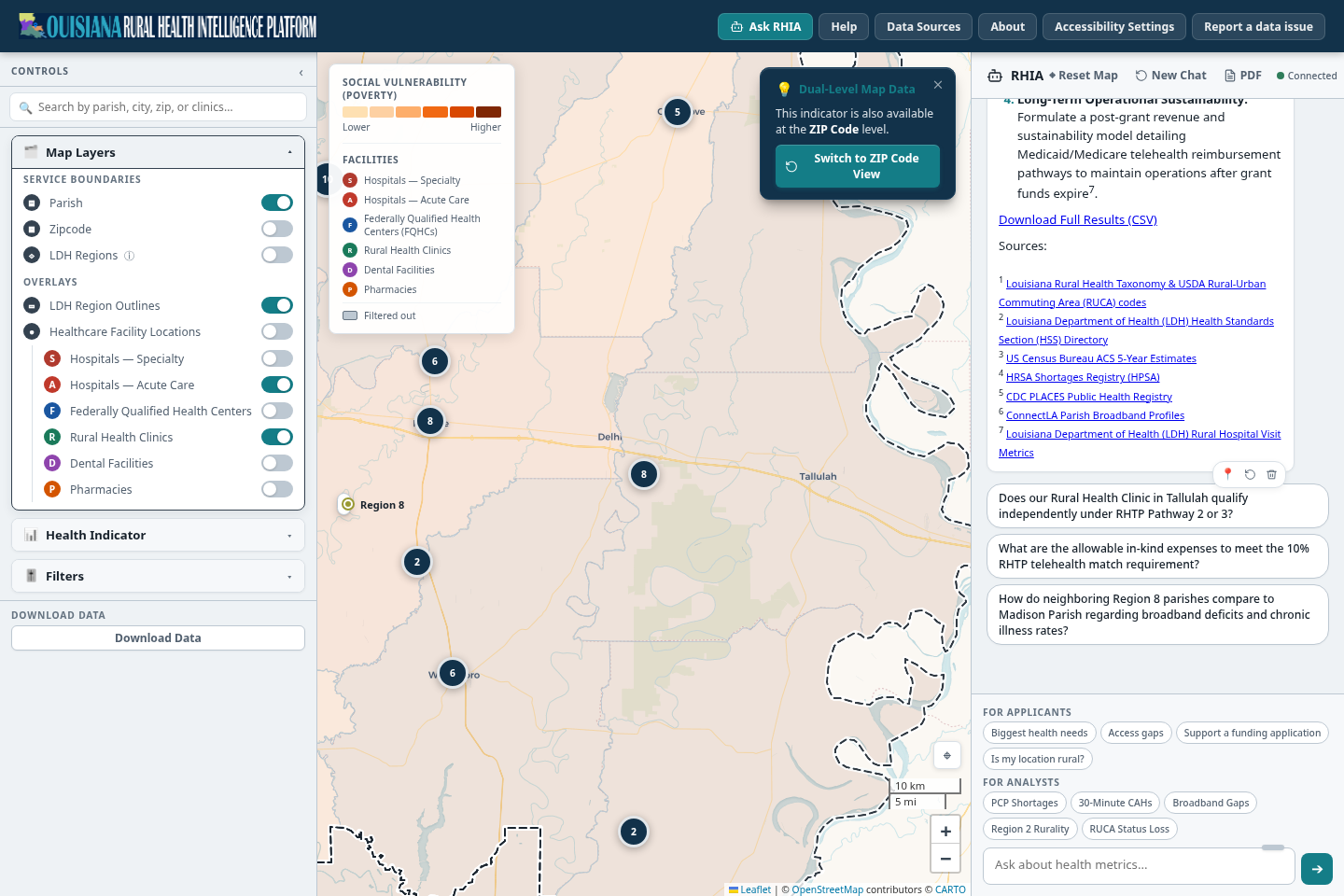
Download Full Results (CSV) saves the figures behind the answer.Numbered sources. Open each one and confirm the figure, the date and the geography.Message actions: restore the map view saved with this answer, regenerate it, or delete it.Suggested follow-ups. Pick the ones that test the answer.
The end of an answer. Sources first, then follow-ups.SOURCES AND FOLLOW-UPS
1Download Full Results (CSV) saves the figures behind the answer.
2Numbered sources. Open each one and confirm the figure, the date and the geography.
3Message actions: restore the map view saved with this answer, regenerate it, or delete it.
4Suggested follow-ups. Pick the ones that test the answer.
Treat each claim as a question
The answer names program requirements, eligibility pathways and cost-share figures. Check each against the funding notice. RHIA reads indexed program documents, and those may not be the version in your notice. Do not enter patient names or other protected health information. Chat may ask you to sign in and has a monthly usage limit.
Prompts to reuse
Replace the bracketed text with your own place and project.
Opportunity screen
For [PARISH OR ZIP], assess rural eligibility, the three strongest documented health or access needs, relevant provider capacity, broadband constraints, and the best-fit RHTP program opportunity. Return an executive summary, evidence table with sources and dates, risks, and five diligence questions.
Compare two places
Compare [PARISH A] and [PARISH B] for a [FACILITY OR SERVICE] investment. Use the same indicators and denominators for both. Separate community need, market capacity, workforce, access, connectivity, eligibility, and data limitations. Recommend what additional evidence the CFO should request before modeling ROI.
Match the notice
Using the indexed funding documents, create a compliance-oriented crosswalk between [PROJECT IDEA] and the program objectives, eligible applicants, eligible costs, required outcomes, deadlines, and evidence requirements. Quote no more than a short phrase; cite the exact document and section for every criterion.
Challenge the case
Act as a skeptical grant reviewer. Identify weak causal claims, unsupported assumptions, missing partners, duplicate capacity, source-age concerns, and eligibility uncertainty in the proposed [PROJECT] for [GEOGRAPHY]. Then list the minimum evidence needed to resolve each issue.
Two more chat controls: Reset Map clears the map settings and New Chat clears the conversation. Use the smaller reset when you can. If a question names a region, such as Region 2, the map switches to the region view as you send it.
Step 7 of 7
Where do the numbers come from, and how do we save the work?
Before anything goes to the board or into an application, each figure needs a source and a date. The Atlas keeps that trail, and this step shows where.
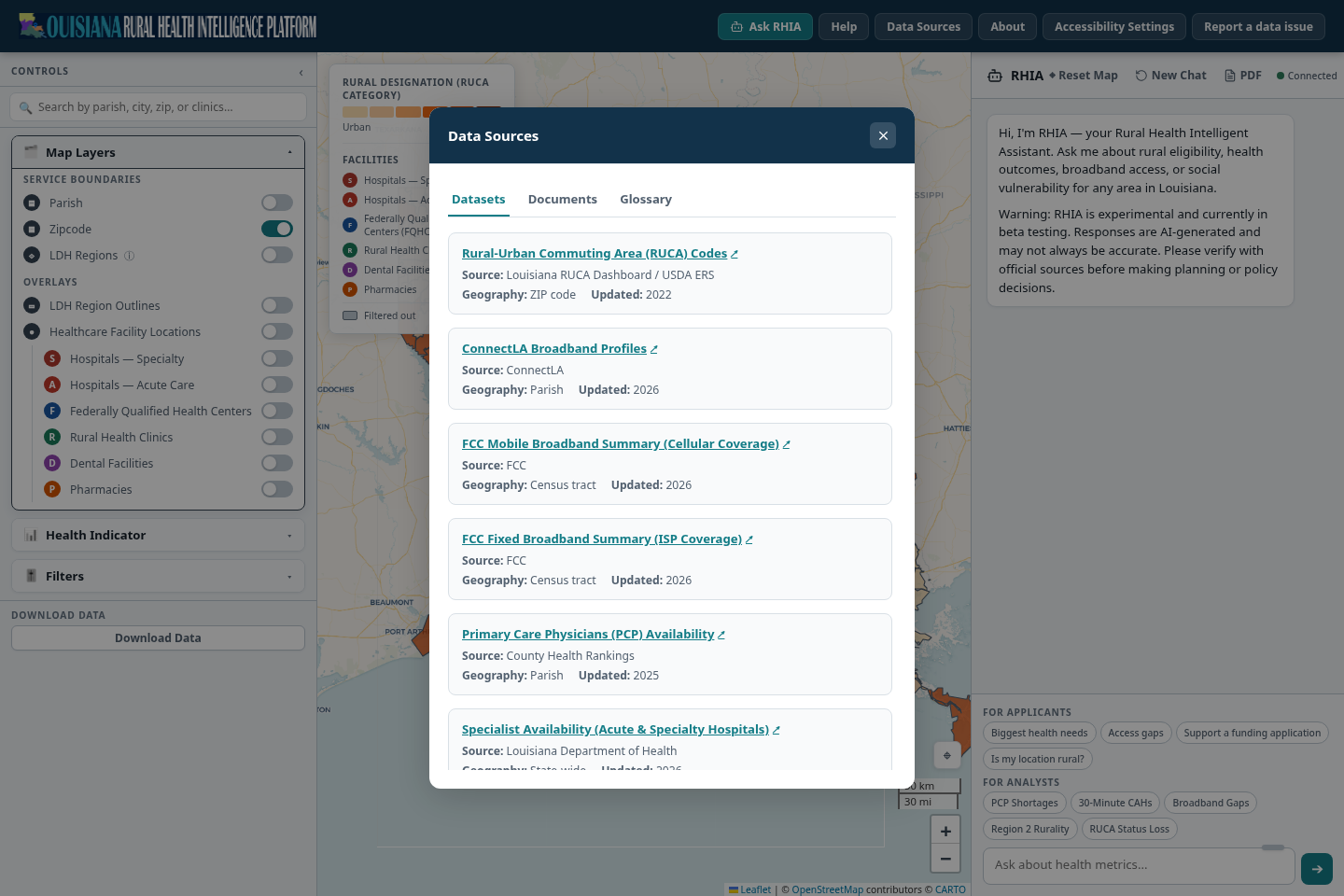
Open Data Sources in the top bar. The Datasets tab lists every dataset with its source, its geography and the year it was updated. The Documents tab lists the policy and program files RHIA reads. Glossary defines the terms.
For each figure in your notes, find its dataset and record the geography and year. Example: ConnectLA Broadband Profiles, parish level, updated 2026.
Save the numbers. Download Data at the bottom of Controls saves a CSV of the current map data. The RHIA answer has its own Download Full Results (CSV) link. PDF in the chat header exports the conversation with the latest map image.
If a number or a facility looks wrong, use Report a data issue, in the top bar or at the bottom of any place summary. The form fills in where you are.
Three tabs: Datasets, Documents and Glossary.Each dataset links to its source.Source, geography and year updated. ConnectLA Broadband Profiles is at parish level and updated 2026.
The evidence trail. Cite the dataset and its year, not just the Atlas.DATA SOURCES
1Three tabs: Datasets, Documents and Glossary.
2Each dataset links to its source.
3Source, geography and year updated. ConnectLA Broadband Profiles is at parish level and updated 2026.
The evidence sheet for Madison Parish
Question
What the Atlas showed
Check before you commit
1. Rural?
Madison Parish: Rural, LDH Region 8, population 9,513.
The funding notice's rural definition, the pathway, and the hospital's facility type.
2. Need
Broadband gap 25.9% (state 19.9%). Poverty 41.1% (state 20.9%). Digital literacy gap 18.9% (state 16.0%). Food access is favorable at 3.0%.
Dataset definition, year and geography in Data Sources.
3. Comparison
Tensas Parish: broadband gap 53.4%, poverty 28.9%. Preset matches 116 of 518 ZIP codes.
The preset ranges, and whether ZIP or parish level suits the argument.
4. Nearby care
Madison Parish Hospital, rural health clinics and pharmacies. Drive-time rings at 15, 30 and 45 minutes.
Registry coverage. Real drive times. Call the facilities.
5. Service area
East Carroll, Madison and Tensas parishes, LDH Region 8.
The program's own region definition and your patient-origin data.
6. RHIA
A draft executive brief with seven cited sources.
Every source, and every requirement against the funding notice.
Date everything
Record the capture date, the dataset year, the source publication date and the version of the funding notice. The word "current" does not work as a citation.
Name an owner
Give each check to a person with the authority to sign it off: grants, compliance, finance, clinical operations or counsel.
Separate facts from assumptions
Label each line as a calculated finding, a source fact, a management assumption or an RHIA suggestion.
Before Friday
The go or no-go checklist.
Use this list in the leadership review. A checked box should point to evidence, an owner and a verification date.
The last question
If the grant ends after the award period, does the project still leave rural health access financially and operationally sustainable?